

MORE POWERFUL SINGLE-COMMAND TABLE GENERATION
The table command is a flexible tool for creating a tabulation, table of summary statistics, table of regression results, or table of results from other Stata commands. Its options allow you to customize numeric and string formats, add stars, and more. Now you can add and customize a title and notes. You can also export the table directly to Excel, Word, LaTeX, and more. And you can do this all with a single table command.
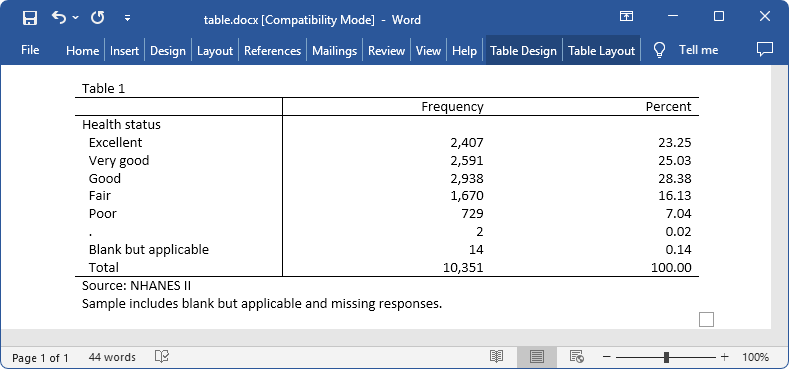
Here we use data from the Second National Health and Nutrition Examination Survey (NHANES II) (McDowell et al. 1981). We tabulate the hlthstat variable, which contains individuals’ self-reported health status categories. We also specify options for adding a title and notes and for exporting the table to a Word document.
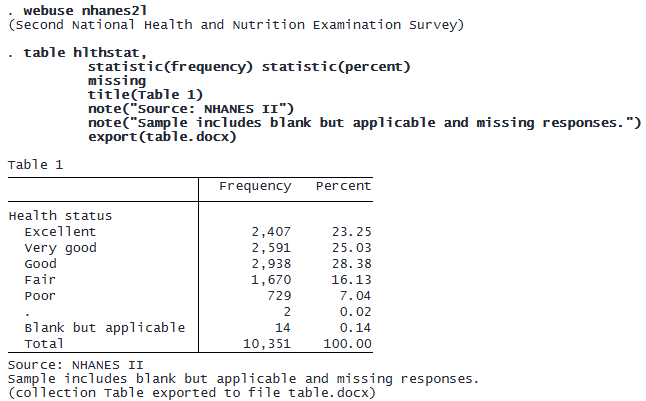
We created a reproducible table and exported it to a Word document in one line of code.
CUSTOMIZABLE ANOVA TABLES
anova and oneway now store their results in the r(ANOVA) matrix. In addition, there is now built-in support to collect these results, so you can build, customize, and publish ANOVA tables in your reports.
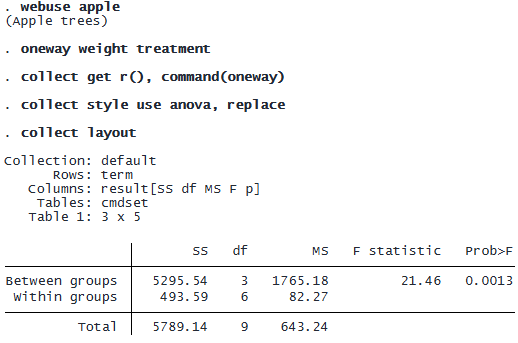
Consider the following one-way ANOVA that models the average weight of apples taken from trees treated with varied amounts of fertilizer. Below, we load the data, fit the model, collect the results, apply the new anova collection style, and replay the default layout of our customizable ANOVA table.
© Copyright 1996–2026 StataCorp LLC. All rights reserved.
The new command() option of collect get provides command-specific result labels that are similar to those obtained when using the collect prefix.
The anova style can be applied to results collected from oneway or anova to automatically create an ANOVA table. We could use additional collect commands to further customize this table and export it.
COLLECTIONS WITH TABULATE
The tabulate, tab1, tab2, tabi, and svy: tabulate commands are frequently used for creating tabulations and tables of summary statistics. Beyond simple tabulations, tabulate provides measures of association, and svy:tabulate provides various tests for survey data. You can now easily build tables that you can customize, style, and publish in reports from the results of these commands. Simply add the collect option to instruct Stata to create a new collection that you can customize with the collect suite of commands.
Below, we create a one-way table of frequencies for regions in our census data. We use the sort option to show the table in descending order of frequencies, and we use the collect option to put those frequencies into a collection named Tabulate.
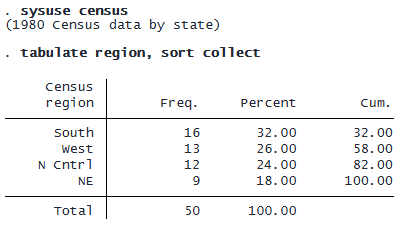
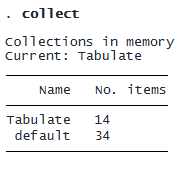
We type collect to see that we now have the Tabulate collection in memory.
collect layout shows us the default table layout for the collection that was created by our tabulate command.
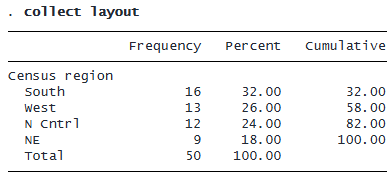
If desired, we can further customize this table and then export it to the file type of our choice.
QUERY THE LAYOUT
To see the layout specification and the table it creates, you can type

However, you may want to see the layout specification without seeing the table. You can now type

REMOVE RESULTS FROM A COLLECTION
With the collect prefix and the collect get command, you collect results from commands that post their results in r() and e(). You can even collect custom results you define using expressions.
Now you can remove results from your collection with collect unget.